2026-08-28 · Feature
Parameter presets and favourites.
Every fleet has a spec: the arming voltage for 3S packs, the rate PIDs that this airframe likes, the flight-mode layout your pilots trained on. The new PRESETS tab turns that spec into named parameter sets and diffs each one live against the connected flight controller — green means the vehicle matches, red means it does not.
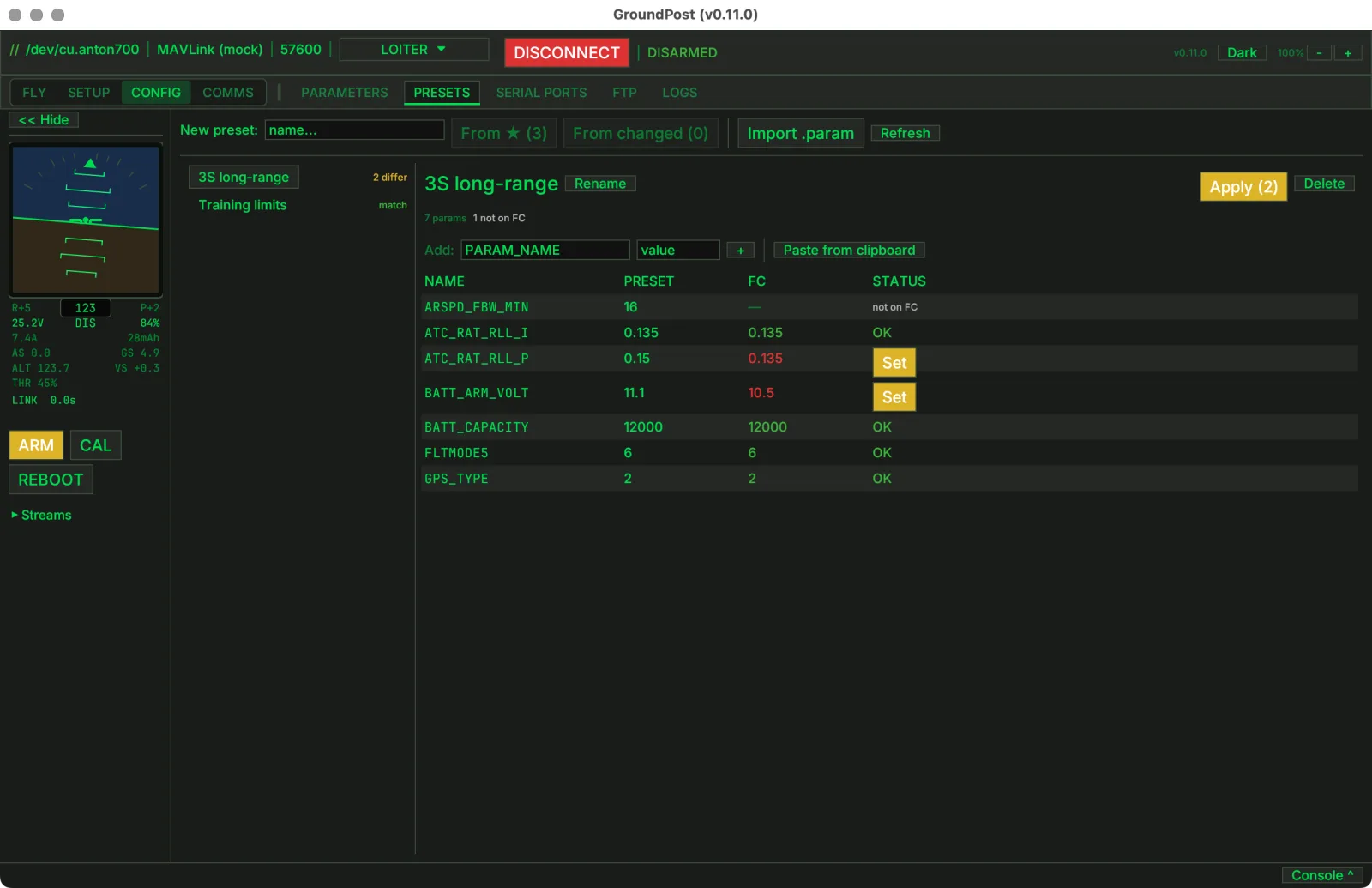
The diff reads like a pre-flight checklist. Rows that match show a green OK; rows that differ show the FC value in red with a Set button that writes just that one parameter. Apply stages every differing value into the Parameters tab's pending edits, where the usual Write confirmation shows exactly what changes before anything touches the aircraft.
Building a preset is quick: star your go-to parameters in the Parameters tab — the new favourites filter keeps them one click away — then snapshot the starred set under a name. Or paste NAME,VALUE lines from the clipboard, import an existing .param file, and add or remove individual rows at any time. Presets are plain parameter files on disk, so sharing a spec with another technician is copying a file.
A preset holds only the parameters you put in it — ten rows, not eight hundred. That makes "does this vehicle match spec" a one-glance answer, on the bench or in the field.
Shipping in the next release · macOS / Windows / Linux